

Broadcom and Westcon-Comstor are committed to helping strategic customers elevate their technical knowledge and respond effectively to cybersecurity threats.
Through the Broadcom Software Education Subscription, eligible users now gain full access to an extensive catalogue of training resources across Symantec and Carbon Black.
This subscription provides a seamless way to access instructor-led training (online), on-demand courses, and virtual lab environments, all designed to deepen product expertise and drive successful solution adoption.
Entitled users can log in through Learning@Broadcom using their Enterprise Support credentials to explore curated curriculums, self-enrol in classes, and engage in practical lab experiences.
Please contact us to find out if you qualify for FREE EDUCATION.
Education subscription
The subscription has been added to active profiles of entitled customers in Learning@Broadcom.
With Enterprise Support login credentials, users will access Learning@Broadcom via the Broadcom Support page to browse the curriculum and self-enrol in classes of interest.
When users log into Learning@Broadcom from the Broadcom Support page, inactive profiles will reactivate. If the user does not find the subscription on their transcript, their newly reactivated profile will be included in system updates; and within 48 hours, the subscription will automatically be added to their transcript.
Users must have a Broadcom Support Account. If an error displays “Permission Denied” when attempting to login at the Learning@Broadcom link, the user needs to upgrade the account from “Basic” to “Enterprise” using the UPGRADE ACCOUNT process on the Broadcom Support page.
Education access
Follow these guides to access on-demand and ILT training (online):
- On-demand training: Follow the instructions in the How to Access the 24x7 On-Demand Training guide to explore our training playlists.
- Live instructor-led training (online): You can register for ITL using the How to Register for Instructor-Led Training guide.
- Instructor-led training course catalogue: https://docs.broadcom.com/doc/instructor-led-training-esg-course-catalog
Carbon Black playlist example
To access the on-demand playlists, ensure your profile is associated with your current Site ID. Once logged into the eLearning platform, follow these steps to access the Carbon Black on-demand playlists:
- Select eLibrary
- Choose Carbon Black Playlists
- Navigate to Carbon Black On-Demand
To find your Site ID, visit this link: Find Your Broadcom Support Site ID
If you experience any issues accessing your Site ID, please log a case using this form:
Lab environment
How to access the VM labs via Broadcom. Below are the initial steps:
Step 1: Login to the Broadcom support portal and go to Learning@Broadcom portal.
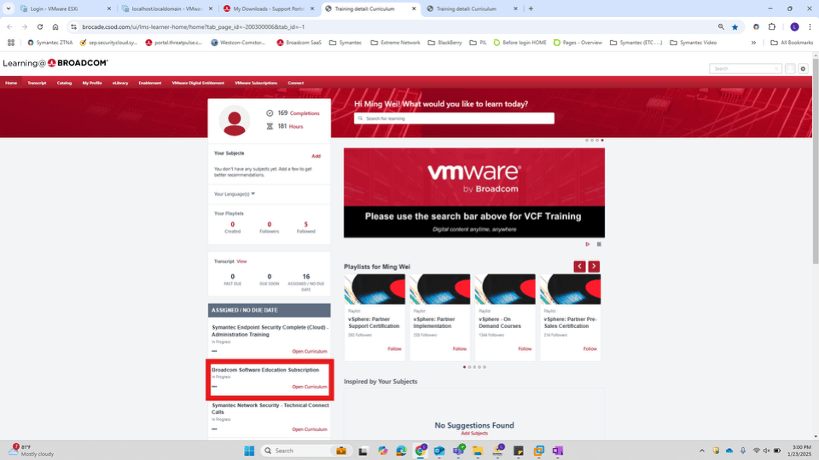
Step 2: Click "Open Curriculum" on Broadcom Software Education Subscription.
Step 3: Choose your solution.
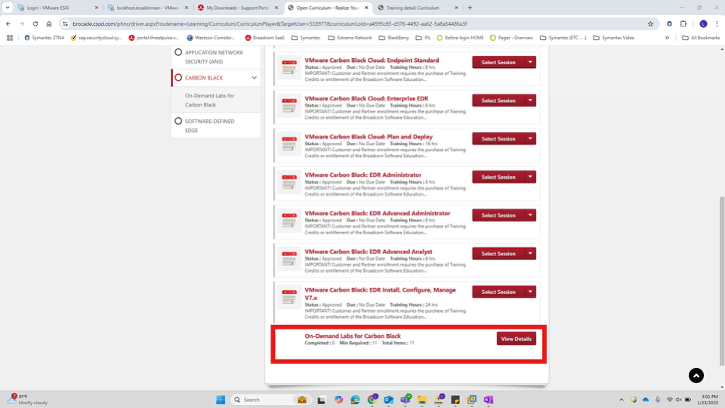
Step 4: Click launch.
Step 5: Lab should launch in another window.
Certification
Validate your Product Knowledge with Broadcom Software certification credentials, get an industry-leading assessment of your network, infrastructure, and security skills. To achieve Broadcom Software Technical Specialist certification, candidates must pass the proctored exam based on a combination of Broadcom Software training material, and real-world job scenarios.
For more information about each available exam, including the study guide and suggested preparation, review the additional material linked from the following web page:
For any information on Certification, please review the FAQ.
IMPORTANT:
For any requests for assistance, please contact your local Education Team for all Business Units:
APJ: APJ.Education@Broadcom.com
TechEDU: Tech.Edu@Broadcom.com
If you need help with Pricing, Quotes, or Token Redemption, please contact: Education Sales & Token Redemption: Education.Sales@Broadcom.com